INTRODUCTION
The ODEx (Onboard Data Exchange) protocol is a set of specifications for the exchange of real time vehicle data, including:
- data concerning the physical vehicle (obtained from the vehicle CAN buses and vehicle signals and sensors)
- data related to the PT services run by the vehicle and
- data related to the ITS-PT equipment installed onboard.
This document describes ODEx core Concepts and its functional specification and topic structure.
Objectives
ODEx has the following objectives:
- ITS-PT Interoperability
- To enable interoperability among onboard ITS-PT equipment and applications (e.g. AVMS units, validators, ticket vending machines, driver terminals, passenger information systems, automatic passenger counting sensors) by standardizing data exchange mechanisms and data formats.
- To enable BackOffice applications to interoperate with onboard ITS-PT equipment and applications using the same standardized data exchange mechanisms
- Management of onboard ITS-PT equipment
- To maintain an up-to-date inventory of all onboard ITS-PT equipment, including their operational status.
- To get information about their firmware version and updates.
- To get information about their configuration data and updates.
- Management of onboard ITS-PT software applications
- To maintain an inventory of onboard ITS-PT applications, including their operational status.
- To get information about their software version and updates.
- To get information about their configuration (e.g. parameters, white lists,…) data and updates.
Document logic
- Section #2.2ODEX FUNCTIONSdescribes the functions required to fulfill the previous ODEx objectives, following a brief summary of key concepts introduced in Section #2.1. SUMMARY OF ODEX CONCEPTS
- Section #2.3ODEX DATA presents the data involved in these functions.
- Sections #2.4EQUIPMENT ITEM, #2.5APPLICATION, and #2.6PROVIDER describe the main ITS-PT components expected to implement these functions and exchange the associated data.
- Section #2.7OPERATIONAL INTERFACE (OPI) defines the interfaces used to exchange operational data.
- Section #2.8GUID (Global Unique Identifier) explains the global unique identifier (GUID) used in ODEx.
- Section #3FUNCTIONAL SPECIFICATION AND TOPIC STRUCTURE describes the data exchange mechanism and topics structure
Alignment with the European Interoperability Framework (EIF)
ODEx is designed with the goals specified in section 5.2 of CEN/TS 13149-7:2020 System and Network Architecture and in accordance with the principles of the European Interoperability Framework (EIF). In particular, ODEx adopts:
- Open standards and publicly available specifications, avoiding vendor-specific technologies and ensuring accessibility for all implementers. ODEx uses MQTT, JSON, J1939, SIRI and Transmodel concepts and topic structures and declaration mechanisms based on the ITxPT’s Active Inventory Specification and can be easily mapped with the ones used in these Specifications.
- Technical and semantic interoperability, through the use of standardized communication protocols and well-defined data structures with consistent meaning across systems.
- Modularity and replaceability, enabling different onboard equipment and backoffice systems, from any provider, to interoperate without proprietary dependencies.
- Transparency and extensibility, ensuring that the ODEx specifications, catalogs and data models can be openly consulted, implemented, and extended by projects and vendors.
By following these EIF principles, ODEx promotes an open, interoperable, and vendor-neutral environment for ITS-PT systems onboard vehicles.
ODEx Documents
Document |
|
|---|---|
ODEx-1. Concepts and Functional Architecture (This document) |
|
ODEx-2. Network Requirements |
|
ODEx-3. Inventory and Updates Interfaces |
|
ODEx-4. Operational Interfaces |
|
ODEx-5. Usage and Examples |
|
CORE CONCEPTS
SUMMARY OF ODEX CONCEPTS
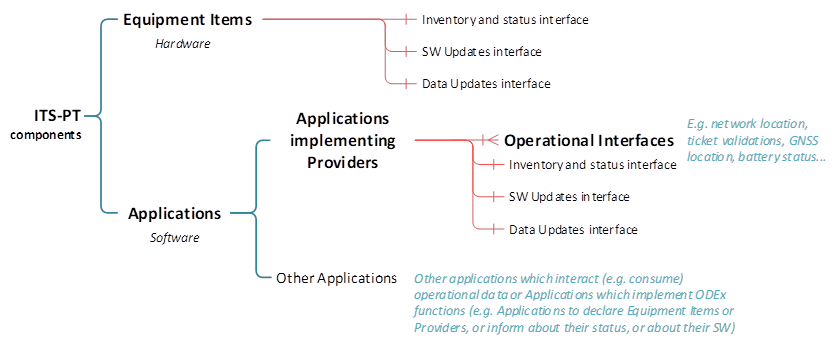
ODEx defines the framework for data exchange between ITS-PT components operating over the vehicle’s onboard IP (ITS-PT) network. These ITS-PT components can be:
- ITS-PT physical elements (hardware), referred to as Equipment Items, and
- ITS-PT software components, referred to as Applications, which include onboard software as well as BackOffice Applications that interact with onboard components.
- Some Applications implement one or more Providers, which are software components that have any of the following functions:
- It accepts commands from other ITS-PT components (e.g. device reset, validator lock, etc.) or
- It publishes operational data: i.e. data related to the PT operation (vehicle network location, occupancy, ticket validations, etc.) and data related to the physical vehicle (e.g. vehicle diagnosis data, speed, energy consumption, physical/GNSS location, passenger area temperature etc.)
- For example, a Validator Application implements a Validator Provider, which publishes information about validation transactions and accepts commands to change its operating mode. It also consumes information from other Providers to know its location in the network (Line, JourneyPattern, Stop) in order to determine the correct fare.
- In a more complex example, a Ticket Vending Machine (TVM) will typically implement a Ticket Vending Provider, which publishes information about ticket vending transactions and accepts commands, a Validator Provider (if the TVM includes an integrated validator) and a Driver Interface Provider, which publishes driver inputs and accept commands with information for the driver.
ITS-PT components interact through interfaces, which define the data published or consumed by ITS-PT components.
An Operational Interface (OPI) is a set of inputs (commands, requests) and outputs (datasets) of a Provider for a specific operational function - such as ticket validation, network location, passenger counting, or any other logical grouping of inputs and outputs of a Provider that is useful for the purposes of operational information exchange.
For example, a Validator OPI defines the data provided by the validator (validation transactions, operating parameters), and the commands accepted by the validator (e.g. to lock the validator).
Providers can be seen as the sources of data while OPIs are a logical grouping of data. If there are two different sources of the same type of data (e.g. two Validators) there would be two Providers implementing the same type of OPI (e.g. Validator)
ODEx requires all Providers to:
- Declare themselves indicating their basic information, operational interfaces that they implement, the topics where they publish data and the topics where they are subscribed to receive commands (if any)
- Provide information about their status (malfunctions, warnings, mode of operation, not running)
Equipment Items must declare all Applications they host and the Providers implemented by each Application, if any.
All Providers, Applications, Updates, and Equipment Items must be identified within ODEx using a globally unique identifier (GUID). This identifier is self-assigned by each component following RFC 9562, using the UUIDv4 format (e.g., bb6abc3b-0772-497e-8aa7-ad689c423c1d). The GUID is persistent and is used within the ODEx topic structure.
ODEX FUNCTIONS
The functions required to fulfill the previous ODEx objectives are the following:
Type |
Equipment Items, Applications and Providers |
Consumers |
|---|---|---|
Inventory |
|
|
|
|
|
Updates |
|
|
|
|
|
Operation |
|
|
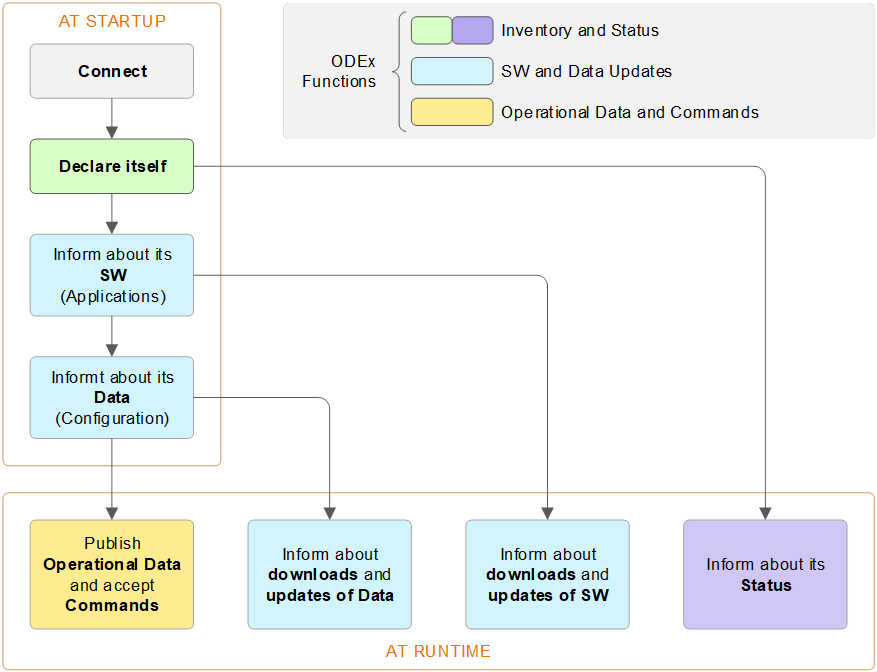
For example, a Validator complying with ODEx will implement the following functions:
- Connect to ODEx MQTT Broker using an MQTT client.
- Declare itself as an Equipment Item (only if the validator is an independent hardware unit, not integrated into a ticket vending machine) and
- Declare itself as a Provider
- Provide information about its software and software updates
- Provide information about its configuration, white lists or other data and their updates
- Provide information about its status (malfunctions, mode of operation)
- Publish data about each validation transaction, publish its operating parameters and accept commands according to a predefined OPI (Operational Interface)
The table in #Anexo A. ODEX summarizes all possible functions in ODEx.
ODEX DATA
In line with the functions described above, the data published in ODEx can be categorized as follows:
- INVENTORY DATA
- Information related to the declaration and identification of Equipment Items and Providers.
- Status of Equipment Items and Providers
- Data concerning the operational state of Equipment Items and Providers, including faults, warnings, and current mode.
- INFORMATION ABOUT UPDATES OF SOFTWARE AND DATA
- Details about the software versions and software updates of Equipment Items and Applications
- Details about the configuration data and data updates. of Equipment Items and Applications
- OPERATIONAL DATA AND COMMANDS, published by Providers. This includes:
- Data related to public transport operations such as vehicle network location (line, journey pattern, previous and next stop, etc.), vehicle scheduling (service journey, calls, delays, deviations, etc.), vehicle occupancy levels, ticket validations, passenger information, messages to the driver, etc.
- Data related to the physical vehicle such as diagnostic data, speed, energy consumption, GNSS location, accelerations, passenger area temperature, etc.
- Commands accepted by Providers to request information or execute some action.
EQUIPMENT ITEM
An Equipment Item is any ITS-PT physical element (hardware) installed in the vehicle, particularly those with IP connectivity, an MQTT client and software implementing the ODEx functions for declaring, providing status information and eventually accepting commands (e.g. reset).
Equipment Items without IP connectivity or without ODEx software could still be declared and provide their status if they are connected or integrated into another Equipment Item with these capabilities.
Equipment Items that host any Provider or that accept commands must be declared and provide status information and information about their software and configuration, as well as any other Equipment Item if their status or other information needs to be made available in the system.
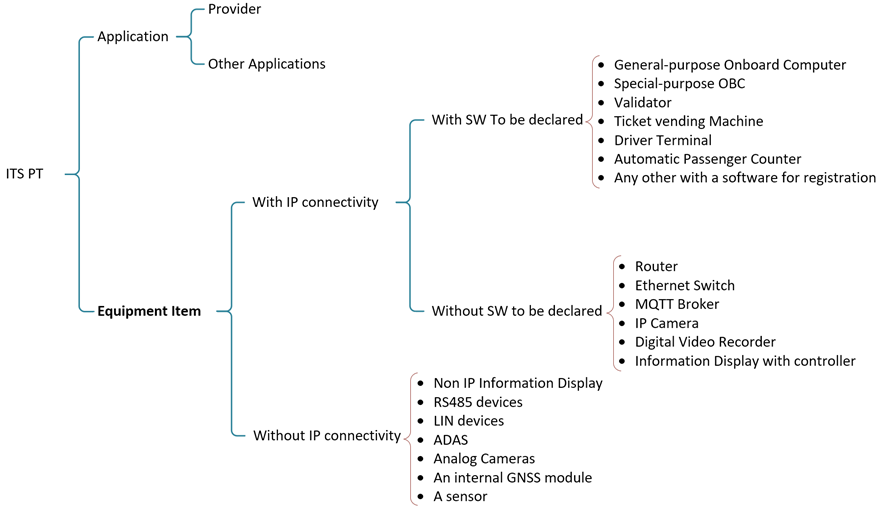
(See #Anexo B. Catalog of Equipment)
APPLICATION
An Application is any ITS-PT software component installed on an onboard Equipment Item.
An Application shall be declared in ODEx if it has the following conditions:
- It holds data that ODEx requires to be shared (including any data defined in ODEx DataGroups). In this case, the Application shall implement the corresponding OPI(s) and declare the Provider(s) implementing those OPI(s).
- Any software component executed in the BackOffice that publishes ODEx data onboard or otherwise participates in ODEx exchanges within the vehicle shall also implement the corresponding OPI(s) and declare the Provider(s) implementing those OPI(s).
- Its software version and SW update status or its Data update status (e.g., configuration, parameters, catalogs, operational datasets, lists) are required to be known, even if the Application does not implement any Provider or publish ODEx data.
PROVIDER
A Provider is a SW component that:
- Publishes operational data and/or
- Accepts commands
- directly to/from the onboard broker or through a gateway application if the Provider is not directly connected to the onboard ITS network (e.g. in the case of a BackOffice application which publishes data onboard).
In addition to publishing operational information or accepting commands, all Providers must:
- Declare themselves, providing the topics to which they publish or are subscribed to receive commands.
If capable, all onboard Providers shall:
- Provide status information.
- Provide information about their software and software updates.
- Provide information about their configuration and data updates.
|
|---|
OPERATIONAL INTERFACE (OPI)
An Operational Interface (OPI) is a set of inputs (commands, requests) and outputs (datasets) of a Provider for a specific operational function - such as ticket validation, GNSS positioning, passenger counting, or any other logical grouping of inputs and outputs of a Provider that is useful for the purposes of operational information exchange.
An Operational Interface can be considered as an instance of a Feature Set in ITxPT specifications.
By definition, a Provider either publishes operational data or accepts commands or both; therefore, each Provider must have at least one OPI that defines such data and commands.
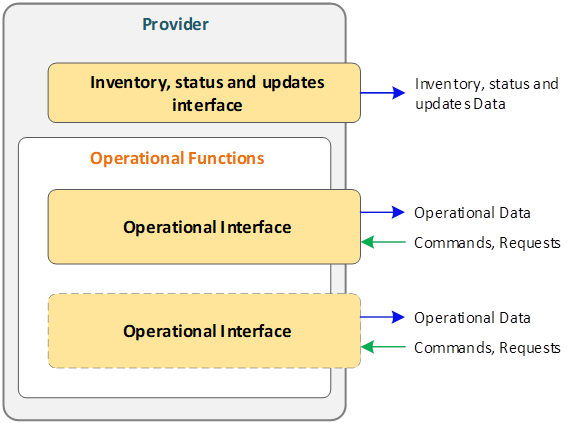
In ODEx, all operational information is organized by Provider (the source of the information), by OPI (a logical grouping of related information), and by DataGroups (which further structure the information published by an OPI).
Projects implementing ODEx shall define the OPI catalog and the Provider types they require. ODEx provides a reference OPI catalog and a set of enums for Provider types, both of which may be used as-is or extended with additional OPIs and Provider types to meet project-specific needs.
Operational Interfaces are defined in other document: ODEx-4. Operational Interfaces
GUID (Global Unique Identifier)
ODEx uses a Global Unique Identifier to univocally identify Providers, Applications, Equipment Items and Updates of software and data.
Concept |
GUID specific name used in ODEx |
|---|---|
Equipment Item |
equip_GUID |
Application |
app_GUID |
Provider |
provider_GUID |
Update of software or data |
update_GUID |
The GUID is self-assigned by each component following RFC 9562, using the UUIDv4 format. In the case of Updates and BackOffice Applications the GUID is generated in the BackOffice.
The GUID is persistent and is used within the ODEx topic structure. Example:
odex/inventory/equipment_items/bb6abc3b-0772-497e-8aa7-ad689c423c1d/
ITEM TYPE
Attribute used in …/infotopics which reside outside of the /operationstructure to indicate the type of item the payload refers to. It can have one of the following values and, depending on its value, it can have different additional information as shown in the table:
ITEM TYPE |
Additional information |
|---|---|
Equipment Item |
<Equipment type> (ej.HOST, SP-OBC, OBU, VAL, TVM, DT, APC…) |
Provider |
<Provider Type> and <Operational Interfaces> (ej. GNSS, NetworkLocation, DoorsStatus…) |
SW Update |
<SW Update Status> (ej. Current, Scheduled, Failed…) |
Data Update |
<Data Update Status> (ej. Current, Scheduled, Failed…) |
FUNCTIONAL SPECIFICATION AND TOPIC STRUCTURE
TOP-LEVEL TOPIC STRUCTURE
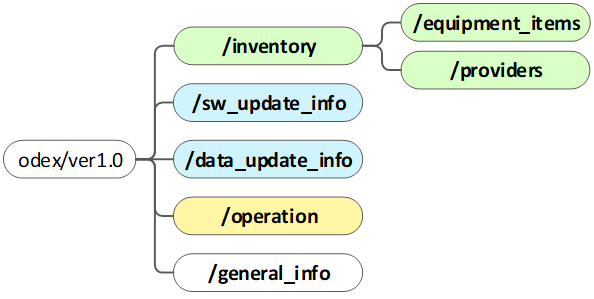
- /inventory: Holds the structured information about installed equipment items (inventory/equipment_items) and active providers (inventory/providers), including the /operation topic paths where they publish operational data or receive commands.
- /sw_update_infoand /data_update_info: Used to publish information about software or data/configuration update attempts (e.g., versions, results, dates). They also hold the currently installed software or data versions.
- /operation: Main topic branch for operational data exchange.
- /general_info: Supplies contextual information about the ODEx environment, such as the current operating mode and broker configuration.
Useful generic subscriptions: (Each subsection lists additional topic-specific filters)
odex/ver1.0/+/+/+/info- Monitors every Equipment Item and Provider and any update they report.
odex/ver1.0/+/+/<GUID>/info- Monitors a single Equipment Item or Provider (identified by <GUID>) and all updates it reports.
GLOBAL TOPIC STRUCTURE
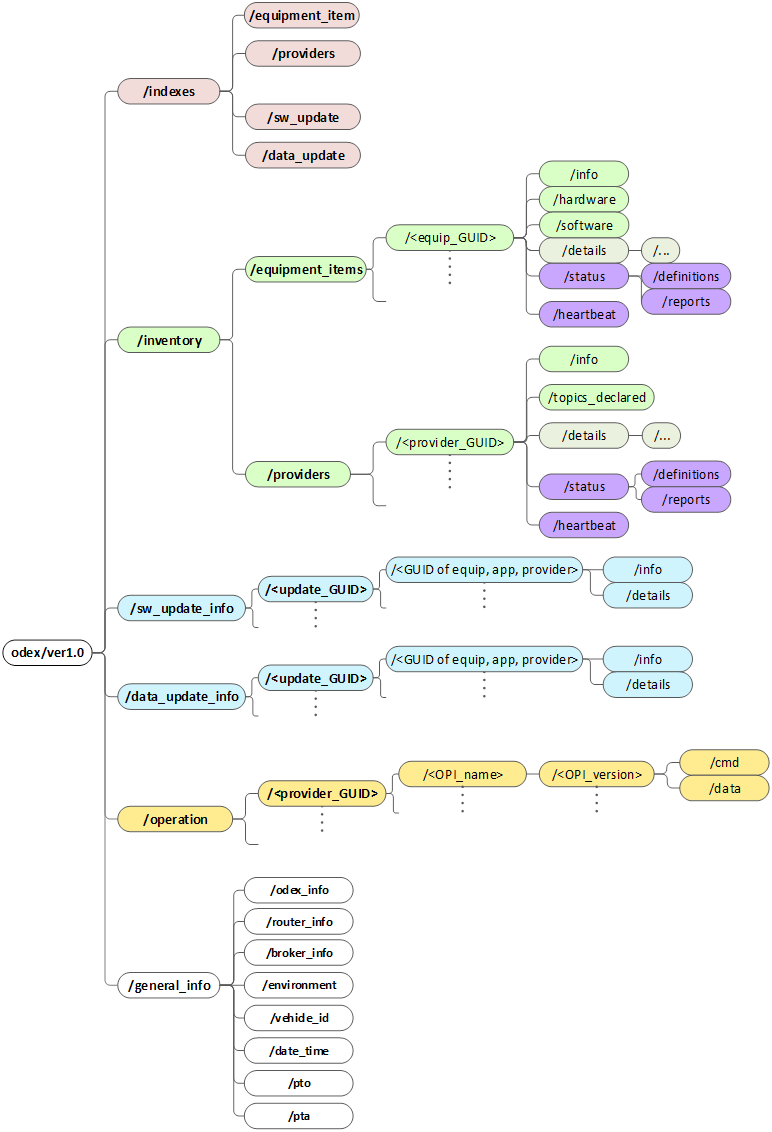
INVENTORY
The main purpose of the inventory is to enable plug-and-play installation of new ITS-PT components on the vehicle, by allowing:
- New Equipment Items (and their hosted Applications and their Providers) or Providers to declare themselves, the data they provide and the commands they accept
- New Equipment Items or Applications to discover the data provided and the commands accepted by otheronboard ITS-PT components
The inventory also supports maintenance, monitoring, and diagnostic tasks, enabling BackOffice applications to identify all Equipment Items and Applications installed on each vehicle and monitor their operational status.
Also, for security reasons, messages sent by Providers which are not registered in the Inventory may be ignored by all subscribers.
Accordingly, the following inventory Equipment item related information is published:
Information aboutEQUIPMENT ITEMS |
Description |
|---|---|
Equipment Items should declare themselves each time they connect to the MQTT broker (e.g. at power on, due to a broker reset). (Notice that eBuses may have the 24V aux power always on. It is assumed that power control device will switch the rest of ITS off) |
|
General information |
|
Hardware description |
|
Current software/firmware |
|
Hosted applications |
|
Equipment status (heartbeat and status) |
|
For Providers, the following related information is published:
Information about PROVIDERS |
Description |
|---|---|
|
|
General information |
|
Operational Interfaces implemented |
|
Topics declared |
|
Provider status (heartbeat and status) |
|
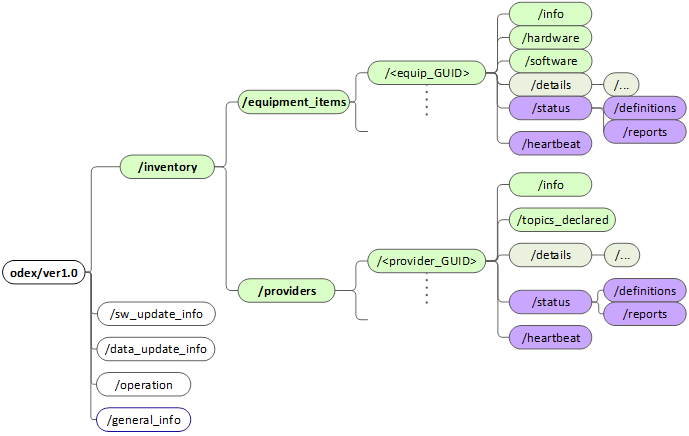
Common subscriptions:
odex/ver1.0/inventory/#- Detects any addition or update of information
odex/ver1.0/inventory/equipment_items/+/info- Basic info from every equipment item
odex/ver1.0/inventory/providers/+/topics_declared- Declared topics for each provider
INFORMATION ON SW AND DATA AND THEIR UPDATES
The purpose of ODEx Update functions is to provide a means to publish information about the software/firmware and Data of the following ITS-PT components:Equipment Items, Providers or other Applications.
Here, the concept of Data includes configuration parameters, catalogs, lists, AI model coefficients or any other data used by these ITS-PT components in operational functions.
The concept of Updates includes the downloading process and the actual update, whether it takes place immediately after downloading or later (e.g. at a specified date or after a particular event such as bus contact off) and includes complete updates as well as unsuccessful downloads or actual update attempts.
Notice that the purpose of ODEx Update functions is not to manage the actual downloading of SW and Data but to provide a place to publish and consume information about the current software and data of each Equipment Item,Provider or other Application and about their Updates.
These ITS-PT components must publish this information each time their MQTT client connects to the broker and after each update.
Each Update must have a unique UUID v4 (update_GUID), which could be assigned by the BackOffice application responsible for the Update or locally if it is not supplied by the BackOffice.
The update_GUIDs for SW and Data information published at power on should be the update_GUIDs corresponding to the downloading and actual Updates of these SW and Data, unless they have never been updated (e.g. factory SW or Data) in which case specific update_GUIDs should be created to publish this information. In this case the same updated_GUIDs should be used at each power on until an Update occurs.
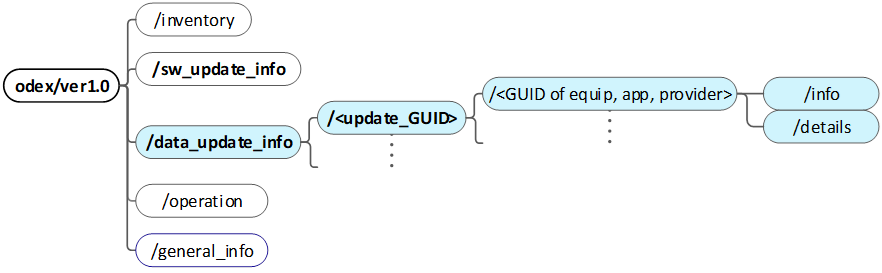
Current software/firmare and Data information of these ITS-PT components and information on their updates must be published under a topic with the update_GUID and a topic under the ITS-PT component GUID:
<root>/sw_update_info/<update_GUID>/<GUID of equip, app, provider>/… (for SW Updates)
<root>/data_update_info/<update_GUID>/<GUID of equip, app, provider>/… (for Data Updates)
This allows publishing information about single updates affecting several ITS-PT components.
Each ITS-PT component will publish this information with retain flag under its own topic /info and /details ) allowing subscribers to monitor the life cycle of each update.
Topic |
Purpose |
Core fields |
|---|---|---|
/info |
|
|
/details |
|
|
Accordingly, the following information related to updates can be discovered:
Information |
Description |
|---|---|
|
|
Current Software Version Information |
|
Pending Software Version Information |
|
Information on software downloads |
|
Information on Updates |
|
The different lifecycle states of an update in ODEx are defined in the following list:
- scheduled: The package is planned but has not been downloaded yet.
- downloading: Device is actively fetching the file.
- pending: File fully downloaded, waiting for install window.
- installing: Installer now running.
- installed: Install step finished OK; version will become current after reboot/self-check.
- current: Version that is in use. Only one can be current.
- failed: Install attempt didn’t succeed.
- rolled_back: Install succeeded but system later reverted to previous version.
- old: previous version that was substituted by the current one.
These states, allow subscribers to monitor updates in all equipment items and applications, while also serve as a filter to identify the current and pending version, downloads and information on all updates.
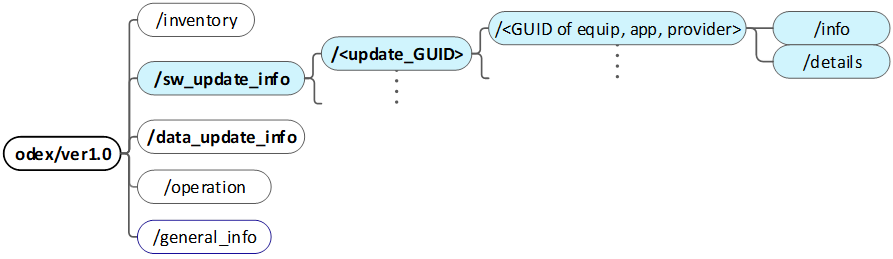
Common subscriptions to know about software updates:
odex/ver1.0/sw_update_info/#- For general supervision, to monitor any software update attempt on the vehicle.
odex/ver1.0/sw_update_info/+/<app_GUID or equip_GUID>- For supervision of all software updates related to a specific equipment item or application/provider.
Common subscriptions to know about data/configuration updates:
odex/ver1.0/data_update_info/# - For general supervision, to monitor any data update attempt on the vehicle.
odex/ver1.0/data_update_info/+/<app_GUID or equip_GUID> - For supervision of all data updates related to a specific equipment item or application/provider.
OPERATION
The main purpose of the /operation topic branch is to structure the operational (business-related) data published by Providers and the topics where commands are accepted by Providers; therefore allowing:
- Providers to publish the operational data they generate in the topics they previously declared in the inventory.
- Other Applications or BackOffice systems to subscribe and consume this data in real time.
- Providers to receive commands in the topics they previously declared in the inventory.
- Authorized applications to send commands to Providers (e.g. reset device, change mode…).
- Operational data in ODEx includes:
- data concerning the physical vehicle (obtained from the vehicle CAN buses and vehicle signals and sensors), and
- data related to the PT services provided by the vehicle
- which is all the data considered in the Operational Interfaces (See ODEx-4)
- Accordingly, the following operation-related information is published:
Information |
Description |
|---|---|
|
|
Provider operational data |
|
Provider command endpoints |
|
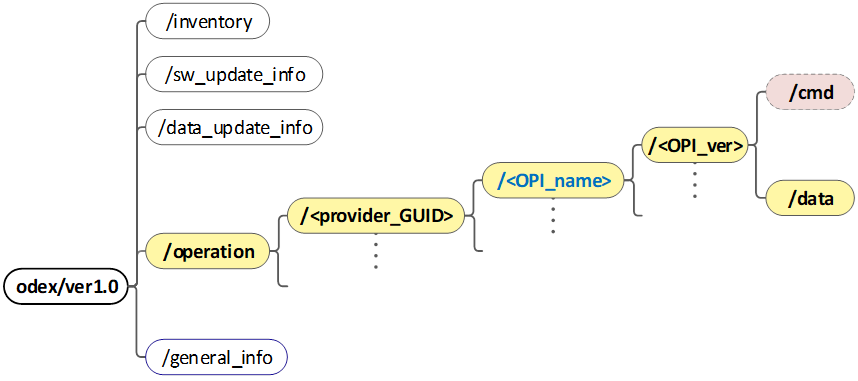
The /operationbranch follows a structure that makes it easy to route and filter every type of message:
- odex/ver1.0/operation/<provider_GUID>/<OPI_name>/<OPI_version>/data/<path to datagroups>
Level 1 - Provider GUID (/<provider_GUID>)
The first path element after /operation is always the provider_GUID. This ties every publication or command to the Provider that owns it and matches the entry previously declared under /inventory/providers/<provider_GUID>.
Level 2 - Operational Interface (/<OPI_name>)
The second element is the Operational Interface name (network_location, validator, ticket_vending, …).
A Provider may publish several Operational Interfaces; each gets its own sub-tree so that consumers can selectively subscribe only to what they need.
Level 3 - Operational Interface Version (/<OPI_version>)
The third element is the Operational Interface Version (“v.X.X” e.g. “v1.0”).
This allows to have a version for each specific OPI, being able to update them unilaterally.
Level 4 - Leaf topics
- /data: Continuous or event-driven operational data streams.
- The provider will publish data using a topic structure under this topic. The lowest level topics in this topic structure must correspond to predefined datagroups in ODEx data dictionary or in a project-specific data dictionary.
- /cmd: Commands (request for actions or requests for information) addressed to the Provider
- To send a command to a Provider, the sender must publish on /operation/<provider_GUID>/<OPI_name>/cmd/<command_name>/<sender_GUID>
- The <sender_GUID> uniquely identifies the issuer (e.g. an application GUID).
- The Provider receiving the command will post its reply on the topic /operation/<provider_GUID>/<OPI_name>/cmd/<command_name>/<sender_GUID>/response
Common subscriptions:
odex/ver1.0/operation/+/+/data - To receive all published operational data from any provider and OPI type.
odex/ver1.0/operation/+/<OPI_name>/# - To receive all published operational data or commands from all versions from a specific OPI type.
odex/ver1.0/operation/<provider_GUID>/<OPI_name>/<OPI_version>/# - To receive all published operational data or commands from a specific OPI type.
odex/ver1.0/operation/<provider_GUID>/<OPI_name>/<OPI_version>/cmd/+/+ - To receive all commands (for the provider receiving the commands)
odex/ver1.0/operation/<provider_GUID>/<OPI_name>/<OPI_version>/cmd/+/<sender_GUID>/response - To receive the response to all commands sent (for the command sender)
GENERAL INFORMATION
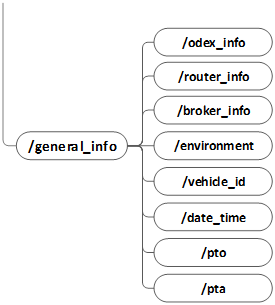
The purpose of this topic is to provide the following information:
- ODEx information
- Version of the data dictionary
- ODEx version
- Router information
- IP address of the onboard router
- Hostname
- Detail (4G, 5G, VPN used)
- Broker information
- IP address and ports
- Hostname
- MQTT versión
- Details
- Environment information
- Vehicle ITS-PT operating mode (e.g., production, testing)
- ITS-PT system startup state (e.g., normal, components starting not ready yet)
- Vehicle identifier
- Date and time
- PTA
- PTO
This information is published at each connection to the broker or whenever the information changes
Common subscriptions:
odex/ver1.0/general_info/#- receives any context change
ANNEX A - ODEX Functions (Informative)
Functions marked with [P] are indicate that an Application implements a Provider.
Equipment (HW) related functions |
Applications (SW) related functions |
|
|---|---|---|
Inventory |
|
|
Status info (inventory related) |
|
|
Updates info |
|
|
Operation |
|
|
Common |
|
|
ANNEX B - Catalog of Equipment Item Types
Equipment Item Type |
Type ID |
Description |
|
|---|---|---|---|
M |
General-purpose Onboard Computer (HOST computer) |
HOST HOST |
General Purpose OnBoard Computer which can host Applications from different suppliers. |
M |
Tablet |
TABLET |
A device that combines a HOST and a Driver Terminal |
M |
Special-purpose OBC |
SP-OBC (not in ITxPT) |
Device with one or more specialized functions, such as:
|
M |
Onboard computer |
OBU OBU |
Onboard computer which does not implement any ODEx function other than Registering Device |
M |
Validator |
VAL TICKETING |
Ticket validator |
M |
Ticket vending Machine |
TVM TICKETING |
This device includes a printer, a driver terminal and possibly a validator and it may also be a general-purpose OBC hosting different ITS applications, such as an AVMS |
M |
Driver Terminal |
DT TERMINAL |
Device for driver interaction, displaying information to the driver and allowing the driver to input messages and commands. |
M |
Automatic Passenger Counter |
APC (not in ITxPT) |
Device which may be made of one APC central unit and several APC sensors (where only the central unit is connected to the ITS network) or where each sensor is connected to the ITS network. |
OP |
Information Display |
SIGN SIGN |
Display integrating a controller connected to the ITS network . A controller could have several displays connected. |
OP |
Digital Video Recorder |
DVR |
|
OP |
Wireless Gateway/Router |
ROUTER VCG |
|
OP |
Switch |
SWITCH |
|
OP |
IP camera |
IPCAM CAMERA |
|
OP |
Other |
OTHR |
Printer, GNSS, Sensor |
MULTIMEDIA |
A device capable of both visual and audio output |
||
AUDIO |
An audio device or separate PA system used for making announcements to passengers or crew. |
||
INTERCOM |
An audio device capable of two-way audio communication |
||
MADT |
A Multi-Application Driver Terminal device |
||
M= These Equipment Items must register and provide status and update information (Mandatory)
OP= These Equipment Items may register and provide status and update information (Optional)
ITxPT equipment items in Green
Table 10.- Catalog of types of Equipment Items